3D printing quality depends on more than just printer settings. Material properties, moisture content, extrusion stability, and equipment conditions all influence the final appearance and performance of printed parts.
During FDM (Fused Deposition Modeling) 3D printing, common 3D printing surface defects include stringing, bubbles, nozzle clogging, and rough surfaces. These issues can affect dimensional accuracy, surface finish, printing efficiency, and material consumption.
Although some defects can be corrected by adjusting printing parameters, others may originate from inconsistent filament quality or improper material handling. Understanding the causes of these problems is essential for achieving stable extrusion and consistent print quality.
This article explores four common FDM 3D printing surface defects, their causes, practical solutions, and how filament manufacturing quality influences printing performance.
Stringing: Why Does Your 3D Print Have Thin Plastic Threads?

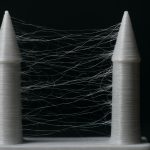
Stringing occurs when thin strands of molten filament form between separate sections of a printed object during nozzle travel movements. It is commonly associated with excessive material oozing.
Main Causes
- High nozzle temperature: Reduces melt viscosity, making filament more likely to leak.
- Insufficient retraction: Allows residual molten material to escape during travel movements.
- Material moisture: May contribute to unstable extrusion.
- Slow travel speed: Gives molten material more time to ooze from the nozzle.
How to Improve?
Adjust nozzle temperature and retraction settings, optimize travel speed, and ensure the filament is properly dried before printing.
Bubbles: Why Are There Bubbles on Your 3D Printed Parts?
Bubbles, small holes, and surface pits can appear when absorbed moisture vaporizes as filament passes through the heated nozzle. This may also produce popping or crackling sounds during extrusion.
Main Causes
- Moisture absorption: Filament absorbs moisture from the surrounding environment.
- Insufficient drying: Trapped moisture vaporizes during printing.
- Improper storage: Exposure to humid air increases moisture content.
- Material degradation: Excessive heat can affect material stability and extrusion quality.
How to Improve: Dry filament according to the manufacturer’s recommendations and store it in sealed, moisture-resistant packaging with desiccants. Proper moisture management is particularly important for PETG and engineering polymers.
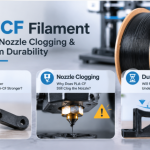
Nozzle Clogging: What Causes 3D Printer Nozzle Blockages?
Nozzle clogging occurs when molten material cannot pass smoothly through the nozzle, resulting in under-extrusion, inconsistent material flow, or printing failure.
This issue requires particular attention when using fiber-reinforced filaments.
Main Causes
- Inappropriate nozzle diameter: Small openings may restrict the flow of fiber-reinforced materials.
- Fiber agglomeration: Poorly dispersed fibers can interfere with extrusion.
- Material contamination: Foreign particles may obstruct the nozzle.
- Incorrect temperature: Insufficient heating prevents proper material melting.
How to Improve: Select a suitable nozzle diameter and maintain appropriate printing temperatures. For carbon fiber reinforced filaments such as PLA-CF and PETG-CF, hardened steel or tungsten carbide nozzles are recommended to reduce abrasive wear.
Rough Surface: Why Does Your 3D Print Look Uneven?
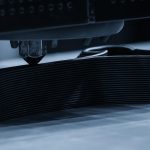
Rough surfaces may appear as irregular layer lines, small bumps, or inconsistent textures. Although some surface texture is normal in FDM printing, excessive roughness may indicate unstable extrusion or unsuitable printing conditions.
Main Causes
- Unstable extrusion: Variations in material flow create uneven deposition.
- Incorrect nozzle temperature: Affects melt viscosity and extrusion consistency.
- Material moisture: Can produce bubbles, pits, and irregular textures.
- Poor fiber dispersion: May contribute to inconsistent material behavior.
- Incorrect printing parameters: Inappropriate layer height, speed, or cooling settings affect surface quality.
How to Improve?
Maintain stable extrusion temperatures, check filament moisture levels, and optimize layer height and printing speed. For composite filaments, consistent fiber dispersion is also important for achieving uniform printing results.
How Filament Manufacturing Quality Affects Printing Performance
Not all printing defects originate from the printer. Filament manufacturing quality also influences extrusion stability, material flow, and final surface finish.
For manufacturers of materials such as PLA-CF and PETG-CF, five factors deserve particular attention.
| Material Quality Factor | Influence on Printing Performance |
|---|---|
| Raw Material Selection | Determines material properties and processing characteristics. |
| Moisture Control | Helps reduce moisture-related bubbles and extrusion instability. |
| Diameter Consistency | Supports stable filament feeding and material delivery. |
| Fiber Dispersion | Helps maintain uniform extrusion behavior in composite filaments. |
| Melt Flow Consistency | Supports smooth extrusion and consistent material deposition. |
Maintaining these properties through controlled production, testing, and packaging helps manufacturers deliver more consistent filament quality.
For carbon fiber reinforced materials, proper fiber dispersion, moisture control, and melt flow characteristics are especially important because they influence both processing behavior and final printed part quality.
Conclusion
 Stringing, bubbles, nozzle clogging, and rough surfaces are common FDM 3D printing surface defects. While printer settings and equipment conditions play important roles, material quality is equally important.
Proper moisture management, stable extrusion, uniform fiber dispersion, and consistent filament dimensions can help reduce printing defects and improve print quality.