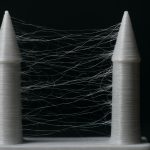
3D printing stringing is a common FDM printing defect in which thin strands of molten filament remain between separate sections of a printed model. These unwanted threads can affect surface appearance, leave residue around small features, and increase post-processing work.
Stringing usually occurs when molten material leaks from the nozzle while the print head moves between different areas of a model. Excessive nozzle temperature, unsuitable retraction settings, filament moisture, and material characteristics can all contribute to the problem.
Understanding these factors helps users identify the actual cause and improve print quality without making unnecessary adjustments.

What Causes Stringing in 3D Printing?
Stringing is primarily related to how molten filament behaves during nozzle movement. The following factors are among the most common causes.
Excessive Nozzle TemperatureWhen the nozzle temperature is too high, filament becomes less viscous and may continue flowing even when the extruder is not actively feeding material. During travel movements, this can produce thin strands between printed sections. |
Incorrect Retraction SettingsRetraction pulls filament back into the extruder system before the print head travels to another location. This helps reduce unwanted material flow from the nozzle. If the retraction distance or speed is insufficient, molten filament may continue leaking during movement. |
|
What to check: Reduce the nozzle temperature gradually within the filament manufacturer’s recommended range. Print a temperature test to identify a suitable balance between clean travel movements and reliable layer bonding. |
What to check: Adjust retraction distance and speed in small increments. Direct-drive and Bowden extruders generally require different settings, so avoid applying the same values to every printer. |
Moisture in FilamentMany 3D printing materials absorb moisture from the surrounding air. When wet filament enters the heated nozzle, absorbed moisture can vaporize and disrupt the extrusion process. |
Travel Movement and Nozzle ConditionTravel speed, travel path, and nozzle cleanliness can also influence stringing. Slow travel movements may give molten material more time to escape from the nozzle. Residual filament around the nozzle tip can also be transferred onto the printed part. |
|
What to check: Dry the filament according to the material manufacturer’s recommended temperature and duration. Store it in a sealed container with desiccant when not in use. |
What to check: Review travel speed and movement settings in the slicer. Enable suitable travel optimizations where supported, and clean the nozzle before printing. |
How to Fix 3D Printing Stringing
Instead of changing several settings simultaneously, troubleshoot one variable at a time. This makes it easier to identify which adjustment actually improves the result.
 ① Check filament condition: Identify moisture-related problems
② Adjust nozzle temperature: Reduce excessive material flow
③ Calibrate retraction: Minimize filament leakage during travel
④ Optimize travel settings: Reduce unwanted contact and oozing
⑤ Inspect the nozzle and extruder: Identify residue or feeding issues
How to Prevent Stringing Before Printing
Preventing stringing starts with consistent material handling and printer preparation.
- Store filament properly: Keep spools in sealed, moisture-resistant packaging with suitable desiccant.
- Dry moisture-sensitive materials: Follow the manufacturer’s drying recommendations, especially after prolonged exposure to humid environments.
- Use calibrated printing profiles: Develop material-specific temperature and retraction settings rather than relying on generic profiles.
- Maintain the extrusion system: Remove nozzle residue and check the extruder for wear or feeding inconsistencies.
- Test new material batches: Run a small calibration print when changing filament types, formulations, or production batches.
These practices help maintain more stable extrusion and reduce the need for repeated troubleshooting.
 Does Filament Material Affect Stringing?
Yes. Different filament materials have different thermal and flow characteristics, which influence how molten material behaves during printing.
PLA generally prints within a relatively accessible temperature range, but it can still produce stringing if the nozzle temperature or retraction settings are unsuitable. PETG may be more prone to visible oozing under certain printing conditions, making temperature and travel calibration particularly important.
 Carbon-fiber-reinforced filaments, such as PLA-CF and PETG-CF, also require material-specific settings. Their printing behavior depends on the polymer matrix, formulation, fiber characteristics, and processing conditions. Carbon fiber content alone does not determine whether a filament will string.
From a material manufacturing perspective, consistent raw material quality, moisture control, melt flow characteristics, and filament diameter consistency all contribute to predictable extrusion performance. These factors provide a foundation for developing reliable printing profiles, although final results also depend on the printer and operating conditions.
Final Recommendations
3D printing stringing is usually caused by a combination of material behavior, nozzle temperature, retraction, moisture, and travel settings. The most effective approach is to identify the cause through controlled testing rather than making random adjustments.
Start by checking filament condition and nozzle temperature, then calibrate retraction and travel settings. With proper material storage, equipment maintenance, and material-specific printing profiles, stringing can be significantly reduced.
For consistent results, always evaluate filament performance using the recommended printing conditions and a repeatable test model.